
How to Navigate Nested JSON Data Without Losing Your Mind
I once spent twenty minutes debugging a null value that turned out to be a typo three levels deep in an API response. The key was userProfile, I’d written userProfiles, and I’d been counting brackets by hand in a wall of minified JSON to find it. If navigating nested JSON data has ever made you question your career choices, pull up a chair — this one’s for you.
The problem isn’t that nested JSON is complicated. It’s that our tools for reading it are often terrible, and our patience runs out around the fourth bracket. Let’s fix both.
If you’re just getting oriented with paths in general, the Complete Guide to JSON Path (2026) covers the full landscape — this article zooms in on the specific pain of deep nesting.
Why Nested JSON Is So Hard to Read
JSON looks friendly on small examples. The trouble starts when real data shows up.
Here’s what actually makes a nested JSON structure hard on your brain:
- Bracket counting. Every
{and[you open, you have to close — and mentally track. Miss one and the whole shape shifts. - Minification. Production APIs ship JSON with zero whitespace. One long line, no indentation, no mercy.
- Mixed types. Objects inside arrays inside objects. A list of users, each with a list of orders, each with a list of items.
- Optional fields. Sometimes
addressis there, sometimes it isn’t. Your code has to survive both. - Silent failures. Access a key that doesn’t exist and most languages hand you
undefinedor aKeyErrorinstead of pointing at the real problem.
None of this is hard in isolation. Stack it three or four levels deep and it becomes a chore. That’s the real reason accessing nested JSON feels miserable — it’s death by a thousand small cognitive taxes.
Here’s a sample we’ll use throughout:
{
  "company": "Foxly",
  "employees": [
    {
      "id": 1,
      "name": "Ada",
      "roles": ["admin", "editor"],
      "contact": {
        "email": "ada@example.com",
        "phones": [
          { "type": "work", "number": "111-2222" },
          { "type": "home", "number": "333-4444" }
        ]
      }
    },
    {
      "id": 2,
      "name": "Grace",
      "roles": ["viewer"],
      "contact": { "email": "grace@example.com", "phones": [] }
    }
  ]
}
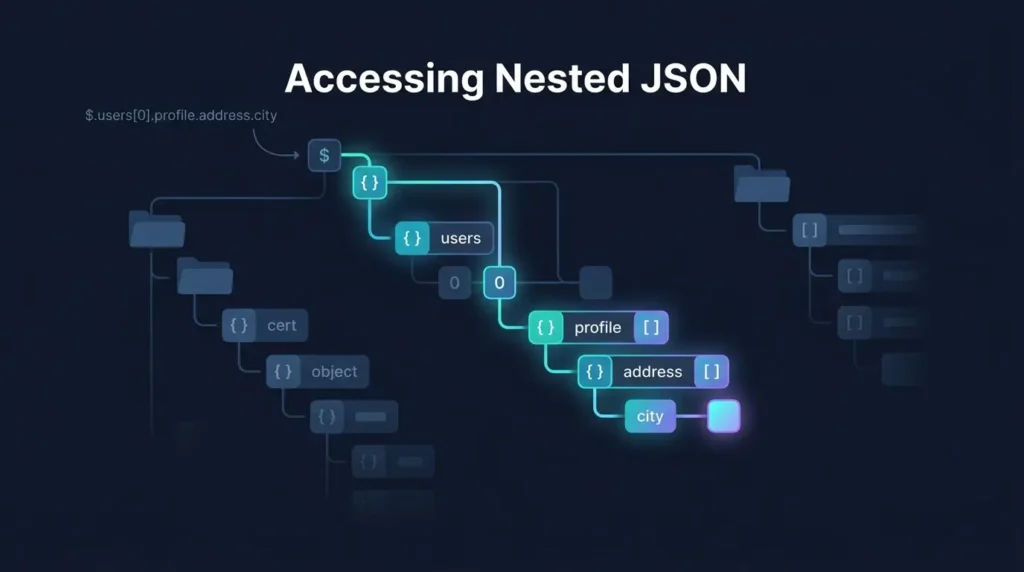
Say you want Ada’s work phone number. That’s employees[0].contact.phones[0].number. Easy to say, annoying to trace by eye. Let’s look at the patterns that show up over and over.
The 3 Nesting Patterns You’ll Meet Constantly
Almost every nested JSON structure you’ll deal with is a variation on one of these three shapes. Learn to recognize them and half the battle’s over.
Pattern 1: Object → Object → Value
Plain nesting. Objects inside objects, drilling toward a single value.
company → (nothing nested here, it's flat)
employees[0].contact.email → "ada@example.com"
This is the friendliest pattern. Dot your way down and you’re done. The only gotcha is a missing intermediate object — if contact doesn’t exist, reaching for .email blows up.
Pattern 2: Array of Objects
The workhorse of API responses. A list where every element is an object with the same shape.
employees[0].name → "Ada"
employees[1].name → "Grace"
The mental shift here is that you’re indexing by position, not name. And position isn’t stable — sort the array differently and employees[0] is now someone else. When order matters, that’s fine. When it doesn’t, you usually want to search by a field instead (more on that in the snippets).
Pattern 3: Arrays Inside Arrays Inside Objects
The one that hurts. Lists nested in objects nested in lists.
employees[0].roles[1] → "editor"
employees[0].contact.phones[0].number → "111-2222"
This is where bracket-counting goes to die. You’re tracking two different index systems (employees[0] and phones[0]) plus the object keys between them. Do this by hand and you will make mistakes. This is exactly the pattern where a tool earns its keep.
The Fast Way: Click Instead of Count
Here’s the honest truth — the quickest way to get a json key path out of deep nesting isn’t to read it. It’s to click it.
Paste your JSON into the JSON Path Finder tool, and it renders the whole structure as a clean, indented tree. Click any value — say, Ada’s home phone number — and it hands you the exact path:
$.employees[0].contact.phones[1].numberWithout any counting and typos. No userProfile vs userProfiles disasters. You copy the path, paste it into your code, and move on with your life.
For the workflow I actually use day to day — inspecting API responses right in the browser without copy-pasting into a separate tab — the JSON Path Finder Chrome extension does the same thing on any JSON page you open. Right-click a value, grab the path, done. If you spend a lot of time in API responses, install it once and you’ll wonder how you managed before.
Accessing Nested JSON in Code
Once you have the path, here’s how to use it safely in the two languages you’re most likely reaching for.
JavaScript
The naive version works until a middle key is missing:
const data = JSON.parse(rawJson);

// Fragile — throws if `contact` is undefined
const phone = data.employees[0].contact.phones[0].number;
Modern JavaScript gives you optional chaining (?.), which is the single best thing to happen to nested access:
// Safe — returns undefined instead of throwing
const phone = data.employees?.[0]?.contact?.phones?.[0]?.number;
Need a fallback value? Pair it with nullish coalescing:
const phone = data.employees?.[0]?.contact?.phones?.[0]?.number ?? "N/A";And when you want to find by field instead of position:
const grace = data.employees.find(e => e.name === "Grace");
const email = grace?.contact?.email; // "grace@example.com"
Python
Direct access throws KeyError or IndexError the moment something’s missing:
import json
data = json.loads(raw_json)

# Fragile
phone = data["employees"][0]["contact"]["phones"][0]["number"]
The safe version uses .get() with defaults:
phone = (
    data.get("employees", [{}])[0]
        .get("contact", {})
        .get("phones", [{}])[0]
        .get("number", "N/A")
)
That’s a little clunky, so for anything beyond a couple of levels, reach for a real JSONPath library:
# pip install jsonpath-ng
from jsonpath_ng import parse

expr = parse("$.employees[0].contact.phones[0].number")
matches = [m.value for m in expr.find(data)]
phone = matches[0] if matches else "N/A"
The library approach is worth it the moment you’re doing this in more than one place — you write the path as a string (the same one the tool gave you) and let the engine handle the traversal.
Quick Comparison: How to Access Nested JSON
| Method | Best for | Handles missing keys? |
|---|---|---|
Direct access (data.a.b.c) | Tiny, guaranteed-present data | ❌ Throws |
Optional chaining (?.) | Everyday JavaScript | ✅ Returns undefined |
Python .get() chains | Shallow Python nesting | ✅ With defaults |
| JSONPath library | Deep or repeated access | ✅ Returns empty |
| Visual tool / extension | Finding the path in the first place | ✅ N/A |
A Few Habits That Save Real Time
- Format before you read. Never try to parse minified JSON by eye. Pretty-print it first, every time.
- Search by field, not index, when order isn’t guaranteed.
find()in JS, a comprehension or filter in Python. - Assume optional. Real APIs drop fields. Write access code that survives a missing key instead of hoping it’s always there.
- Copy paths, don’t type them. The number of bugs that come from a mistyped key is genuinely embarrassing. Let a tool generate them.
FAQ
Use a visual tool. Paste the JSON, click the value, copy the generated path. It removes the two biggest error sources — bracket counting and key typos.
Optional chaining (?.) in JavaScript, .get() with defaults in Python, or a JSONPath library in either. All three return a safe empty/undefined value instead of throwing.
Almost always an optional field or a shifting array order. If data.a.b.c works for one record and not another, b is probably missing in the failing case. Guard for it.
For deep or repeated access, yes. You write the path once as a string and the engine handles the walk, which is cleaner than long chains of brackets and safer against missing keys.
Yes — that’s exactly what the Chrome extension is for. It reads JSON on the page you’re viewing and gives you the path on click, no copy-paste required.
Stop Counting Brackets
Nested JSON isn’t going anywhere. Every API, every config file, every log line you’ll touch for the rest of your career has some version of this shape. The developers who stay sane about it aren’t smarter — they’ve just stopped doing the tedious part by hand.
Format your JSON. Guard your access code. And when you need a path out of something four levels deep, click it instead of counting.
Install the JSON Path Finder Chrome extension and grab any nested path in one click, right where you’re already working. It’s free, it’s fast, and it’ll save you from at least one userProfiles-shaped bug this week.